MD8 viewer (USB connection)
* Software downloads are
a members-only service.
*If you wish to download, please
login as a member and click "Download."
The download button is at the bottom of the page.
Application software overview
MD8 Viewer is client software that operates a PC with the Wireless Watcher application software installed as a data server and allows the measurement data etc. stored on the data server to be viewed mainly from a PC connected via LAN.
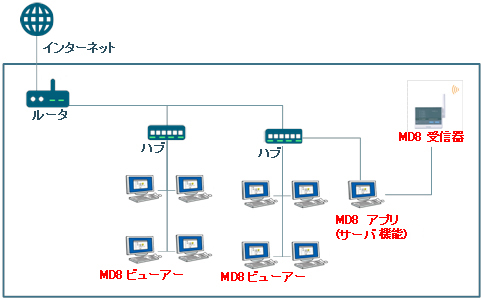
Viewer Features
- List screen synchronization (every minute)
- Drawing trend graphs
- CSV file output (manual operation only)
- Check operation history and alarm history (however, the viewer operation history will not be saved)
Applications
- When you want to view and use measurement data from a separate building or location
- When you want to share measurement data
Before Use
- An Ethernet connection is required.
- To use the viewer, you will need to configure the Ethernet settings on the PC on which the Wireless Watcher application software is installed. (For details, please refer to the Network Access Permission Settings instruction manual below.)
- This software (MD8 viewer) cannot directly operate the MD8 unit.
- Depending on the network security, you may not be able to use this function.
- The version of the wireless watcher application software must be Ver.2.21 or later.
- We recommend using the viewer on up to four PCs.
- If you are using the viewer, you will need a Windows client CAL.
- Please check the operating environment before use.
Application software overview
| Software Name |
MD8 viewer (64-bit version)
MD8Viewer_103_x64 |
MD8 viewer (32-bit version)
MD8Viewer_102_x86 |
| Compatible models |
Wireless watcher application software (MD800A-00U) |
| File size |
Ver.1.03 |
約6MB |
| Ver.1.02 |
約5MB |
| Operating environment* |
Supported OS |
Ver.1.03
(64bit) |
Microsoft Windows 11
Microsoft Windows 10
Microsoft Windows 8/8.1
Microsoft Windows 7 or later
*All supported operating systems are Japanese versions and .NET Framework 4.6 or later is required. |
Ver.1.02
(32bit) |
Microsoft Windows 8/8.1
Microsoft Windows 7 or later
Microsoft Windows Vista SP2 or later
*All supported operating systems are Japanese versions and .NET Framework 4.0 or later is required.
*Operation has not been verified on Microsoft Windows XP. |
| Disk space |
Free space on the system drive: 100MB or more |
| Memory capacity |
1GB or more
|
| Copyright holder |
CHINO Corporation |
| Reprint conditions |
Reproduction prohibited |
| File models |
Windows installer models (exe)
*This is the file models after unzipping the zip file. |
How to install
Download MD8Viewer_103_x64.zip or MD8Viewer_102_x86.zip, unzip it, and then double-click the exe file to install.
Installation Notes
- If .NET Framework 4.6 or .NET Framework 4.0 is not installed on your PC, it will be installed before installing the MD8 Viewer. The installation of this software takes time, so please allow yourself plenty of time to complete the installation.
- You must be connected to the Internet when installing .NET Framework 4.6 or .NET Framework 4.0.